Authentication and Authorization
ID-Flow uses the standard OAuth2 authentication protocol to authenticate users, and to safeguard and protect user's data. Users must authenticate to gain access to their data, and strict policies are in place to ensure that users may only access their own data.
ID-Flow makes use of an Access Token (also known as Bearer Token), and a Refresh Token.
-
The Access Token is the token which is received upon successful login. The access token will be sent in the header of each API request to authenticate the particular request and identify which user is making the request.
- Access tokens expire in 60 minutes.
-
Once the Access Token expires, the Refresh Token is then used to gain a new access token. This is to prevent the user having to constantly log in, and of course without having to store the user credentials.
- The Refresh Token expires after 30 days.
The standard ID-Flow login flow is as follows:
- The user enters their email address, to receive the confirmation email (also known as magic link email).
- This can either be entered directly into the KYC flow portal.
- This can also be generated directly by calling the
api/magic-linkapi.
- The link in the email will contain both the userId and the code as query parameters.
- When the link is opened, the userId and code are read from the query parameters. These are sent as parameters again to the
api/magic-link-confirmendpoint, where they are verified. If the authentication is successful, then the Access and Refresh tokens will be returned. - The access token can then be used to authenticate any request on behalf of the user.
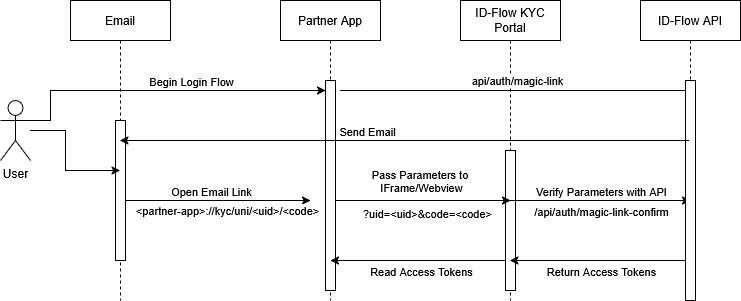
When authenticating through a partner app that has ID-Flow embedded within an IFrame/Webview, the authentication flow is similar to the above. The difference however is as follows:
- The email link will be adjusted accordingly, and instead will contain a deep link to open the app. Example,
<app-name>://kyc/uni/<uid>/<code>
- The app, upon being opened, must retrieve the relevant query parameters from the deep-link and pass them as query parameters to the IFrame/Webview which loads the ID-Flow KYC flow.